 Model Deployment with Serverless Architectures
We should learn serverless architectures for model deployment because they enable highly scalable, cost-efficient, and low-maintenance ML inference without managing infrastructure. This approach accelerates deployment cycles, reduces operational overhead, and allows seamless integration with cloud-native services for production-grade ML solutions.
Welcome
Hey — I'm Aviraj 👋
We should learn serverless architectures for model deployment because they enable highly scalable, cost-efficient, and low-maintenance ML inference without managing infrastructure. This approach accelerates deployment cycles, reduces operational overhead, and allows seamless integration with cloud-native services for production-grade ML solutions.
🔗 30 Days of MLOps
📖 Previous => Day 26: Project: End-to-End MLOps Pipeline
📚 Key Learnings
- Understand what serverless architectures are and their advantages in ML deployments
- Learn how to deploy models on AWS Lambda, Google Cloud Functions, and Azure Functions
- Explore API Gateway integration for exposing models as REST endpoints
- Implement cold start optimization strategies for serverless ML workloads
- Learn to manage model storage in S3, GCS, or Blob Storage for serverless inference
🧠 Learn here
What is Serverless Architecture?
Serverless architecture is a cloud computing execution model where the cloud provider dynamically manages the allocation and provisioning of servers. Developers focus solely on writing code in the form of small, independent functions, while the underlying infrastructure is fully managed by the provider. This eliminates the need to maintain physical servers or virtual machine instances.
Popular serverless services include:
- AWS Lambda
- Google Cloud Functions
- Azure Functions
In serverless computing, you are billed only for the compute time consumed—there are no charges when code is not running.
Advantages of Serverless Architecture
- No Server Management: No need to maintain or patch servers.
- Automatic Scaling: Handles varying workloads seamlessly.
- Cost Efficiency: Pay only for the compute time used.
- Faster Time to Market: Focus on writing and deploying functions without infrastructure setup.
- High Availability: Built-in redundancy and failover provided by cloud providers.
How it works?
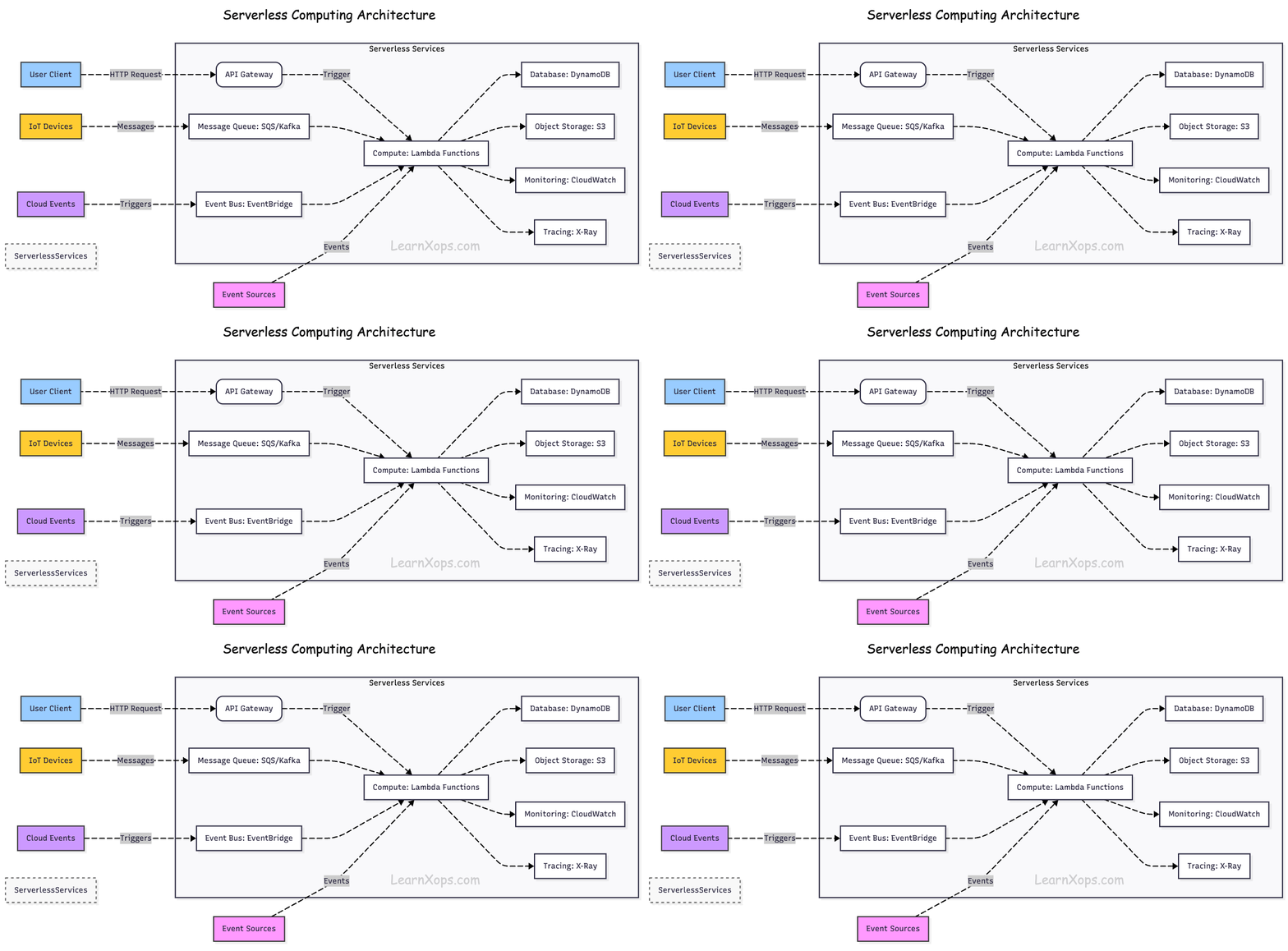
- Event-Driven Execution: Functions are triggered by events (HTTP requests, database changes, file uploads, etc.).
- Managed Infrastructure: The cloud provider automatically provisions, scales, and manages servers.
- Stateless Functions: Each function runs in isolation and does not store state between executions.
- Automatic Scaling: Functions scale up and down automatically based on demand.
Advantages of Serverless in ML Deployments
Serverless architecture offers unique benefits for Machine Learning (ML) deployments:
1. On-Demand Inference
ML inference functions can be triggered by events (API requests, file uploads) and run only when needed. Reduces idle compute costs for infrequent prediction workloads.
2. Elastic Scaling for Spiky Traffic
Automatically handles sudden bursts in prediction requests without pre-provisioning. Ideal for seasonal or event-driven ML applications.
3. Simplified Model Deployment
Models can be packaged into lightweight serverless functions. Quick deployment without managing Kubernetes clusters or EC2 instances.
4. Integration with Cloud Services
Easy integration with cloud storage (S3, GCS), databases, message queues, and data pipelines. Enables real-time triggers (e.g., new image in bucket → trigger image classification).
5. Cost-Effective for Low-Volume Use Cases
Pay only when the ML model is invoked. Suitable for prototypes, experiments, and infrequent prediction scenarios.
6. Multi-Language & Environment Support
Supports multiple runtimes (Python, Go, Node.js, Java), making it easy to deploy models in preferred frameworks (TensorFlow, PyTorch, Scikit-learn).
Example Use Cases in ML
- Real-Time Image Classification: Triggered by file upload
- Chatbot Inference: Triggered by user messages
- Fraud Detection: Triggered by transaction events
- Recommendation Engines: Triggered by user interactions
- Sentiment Analysis: Triggered by incoming text data
Deploying Models on Serverless Platforms
Prerequisites
- Python 3.10+ locally
- Basic model artifact (e.g., model.onnx or pickled .pt/.pkl)
- Cloud CLIs installed and logged in:
- AWS: aws, sam (optional)
- GCP: gcloud
- Azure: az, func (Azure Functions Core Tools)
- Container runtime (Docker) if using container-based functions
Tip: Prefer ONNX or TorchScript for portable CPU inference.
Common Patterns
- Store model in object storage (S3/GCS/Blob). Download once, cache in /tmp or global var.
- Global scope cache: Load model at import time to reuse across warm invocations.
- Small deps: Use light runtimes; avoid heavy scientific stacks unless using container images.
- Batching: Accept arrays of items to reduce per-invocation overhead.
- Timeouts & memory: Increase memory to speed CPU-bound inference; set timeouts liberally.
- Observability: Log latency, input size, and cold/warm flag.
Example Global Cache Pattern
# common_cache.py
import os, time
_model = None

def get_model(loader):
    global _model
    if _model is None:
        t0 = time.time()
        _model = loader()
        print(f"model_loaded_ms={(time.time()-t0)*1000:.1f}")
    return _model
AWS Lambda Deployment
Option A — ZIP + Lambda Layer (lightweight deps)
Folder Structure:
aws-lambda-zip/
├─ app.py           # handler
├─ requirements.txt # only light deps (e.g., onnxruntime, numpy)
└─ model/           # optional: small model (<50 MB). Prefer S3.
app.py (downloads from S3 on first run, caches globally):
import json, os, boto3
from common_cache import get_model

S3_BUCKET = os.environ["MODEL_BUCKET"]
S3_KEY    = os.environ["MODEL_KEY"]
LOCAL     = "/tmp/model.onnx"

s3 = boto3.client("s3")

def _load_model():
    if not os.path.exists(LOCAL):
        s3.download_file(S3_BUCKET, S3_KEY, LOCAL)
    # Load your model (example for ONNX)
    import onnxruntime as ort
    return ort.InferenceSession(LOCAL)

model = None

def handler(event, context):
    global model
    model = model or get_model(_load_model)
    body = json.loads(event.get("body", "{}"))
    x = body.get("inputs", [])
    # Adapt to your model's I/O
    outputs = model.run(None, {model.get_inputs()[0].name: x})
    return {"statusCode": 200, "body": json.dumps({"outputs": outputs[0]})}
Deploy (quick start):
# Install deps locally for packaging (Linux-compatible wheels)
pip install -r requirements.txt -t ./package
cp -r app.py common_cache.py package/
(cd package && zip -r ../function.zip .)

aws lambda create-function \
  --function-name ml-infer-zip \
  --runtime python3.11 \
  --handler app.handler \
  --role arn:aws:iam::<ACCOUNT>:role/<LambdaExecRole> \
  --timeout 30 --memory-size 2048 \
  --environment Variables={MODEL_BUCKET=<bucket>,MODEL_KEY=<key>} \
  --zip-file fileb://function.zip

# HTTP endpoint (simple):
aws lambda create-function-url-config \
  --function-name ml-infer-zip \
  --auth-type NONE
When to use: Small models & lightweight deps (<50–100 MB unzipped). For larger stacks, use container images.
Option B — Container Image (ECR)
Dockerfile (AWS base image includes runtime):
FROM public.ecr.aws/lambda/python:3.11
COPY requirements.txt ./
RUN pip install -r requirements.txt
COPY app.py common_cache.py ./
CMD ["app.handler"]
Build & deploy:
aws ecr create-repository --repository-name ml-infer || true
aws ecr get-login-password | docker login --username AWS --password-stdin <acct>.dkr.ecr.<region>.amazonaws.com

docker build -t ml-infer .
docker tag ml-infer:latest <acct>.dkr.ecr.<region>.amazonaws.com/ml-infer:latest
docker push <acct>.dkr.ecr.<region>.amazonaws.com/ml-infer:latest

aws lambda create-function \
  --function-name ml-infer-img \
  --package-type Image \
  --code ImageUri=<acct>.dkr.ecr.<region>.amazonaws.com/ml-infer:latest \
  --role arn:aws:iam::<ACCOUNT>:role/<LambdaExecRole> \
  --timeout 60 --memory-size 4096
Tuning
- Provisioned Concurrency to reduce cold starts
- Reserved Concurrency to cap cost
- x86_64 vs arm64: arm64 often cheaper/faster for CPU-bound
Google Cloud Functions (2nd Gen, HTTP)
Folder Structure:
gcf/
├─ main.py
├─ requirements.txt
└─ .gcloudignore
main.py (Flask-style HTTP function):
import functions_framework, os, json
from google.cloud import storage
from common_cache import get_model

BUCKET=os.environ["MODEL_BUCKET"]
KEY=os.environ["MODEL_KEY"]
LOCAL="/tmp/model.onnx"

@functions_framework.http
def infer(request):
    model = get_model(load_model)
    data = request.get_json(silent=True) or {}
    x = data.get("inputs", [])
    outputs = model.run(None, {model.get_inputs()[0].name: x})
    return (json.dumps({"outputs": outputs[0]}), 200, {"Content-Type": "application/json"})

def load_model():
    if not os.path.exists(LOCAL):
        client = storage.Client()
        client.bucket(BUCKET).blob(KEY).download_to_filename(LOCAL)
    import onnxruntime as ort
    return ort.InferenceSession(LOCAL)
Deploy:
gcloud functions deploy ml-infer \
  --gen2 --region=<region> \
  --runtime=python311 --entry-point=infer \
  --trigger-http --allow-unauthenticated \
  --set-env-vars=MODEL_BUCKET=<bucket>,MODEL_KEY=<key> \
  --memory=2GiB --timeout=60s --min-instances=0 --max-instances=50
Tuning
- min-instances > 0 reduces cold starts (costs idle)
- Prefer regional to reduce latency
- For heavier models consider Cloud Run (container) for more CPU/RAM
Azure Functions (Python v2 model, HTTP trigger)
Create project:
func init azfunc-ml --python
cd azfunc-ml
func new --name infer --template "HTTP trigger"
infer/__init__.py:
import json, os, azure.functions as func
from azure.storage.blob import BlobClient
from common_cache import get_model

BUCKET=os.environ["MODEL_CONTAINER"]
KEY=os.environ["MODEL_BLOB"]
CONN=os.environ["AZURE_STORAGE_CONNECTION_STRING"]
LOCAL="/tmp/model.onnx"

def load_model():
    if not os.path.exists(LOCAL):
        bc = BlobClient.from_connection_string(CONN, container_name=BUCKET, blob_name=KEY)
        with open(LOCAL, "wb") as f: f.write(bc.download_blob().readall())
    import onnxruntime as ort
    return ort.InferenceSession(LOCAL)

model=None

def main(req: func.HttpRequest) -> func.HttpResponse:
    global model
    model = model or get_model(load_model)
    data = req.get_json(silent=True) or {}
    x = data.get("inputs", [])
    outputs = model.run(None, {model.get_inputs()[0].name: x})
    return func.HttpResponse(json.dumps({"outputs": outputs[0]}), mimetype="application/json")
Create Function App & Deploy:
# Create a resource group, storage, and a Premium plan for better cold-starts
az group create -n rg-ml -l <region>
az storage account create -n <storage> -g rg-ml -l <region> --sku Standard_LRS
az functionapp plan create -g rg-ml -n plan-ml --location <region> --number-of-workers 1 --sku EP1
az functionapp create -g rg-ml -p plan-ml -n func-ml-infer --storage-account <storage> --runtime python --functions-version 4

# App settings
az functionapp config appsettings set -g rg-ml -n func-ml-infer \
  --settings AZURE_STORAGE_CONNECTION_STRING="$(az storage account show-connection-string -n <storage> -g rg-ml -o tsv)" \
             MODEL_CONTAINER=<container> MODEL_BLOB=<blob>

# Deploy
func azure functionapp publish func-ml-infer
Tuning
- Use Premium (EP) or Dedicated for pre-warmed instances
- WEBSITE_RUN_FROM_PACKAGE=1 speeds cold starts
- Heavy models? Consider Azure Container Apps/AKS for more CPU/RAM
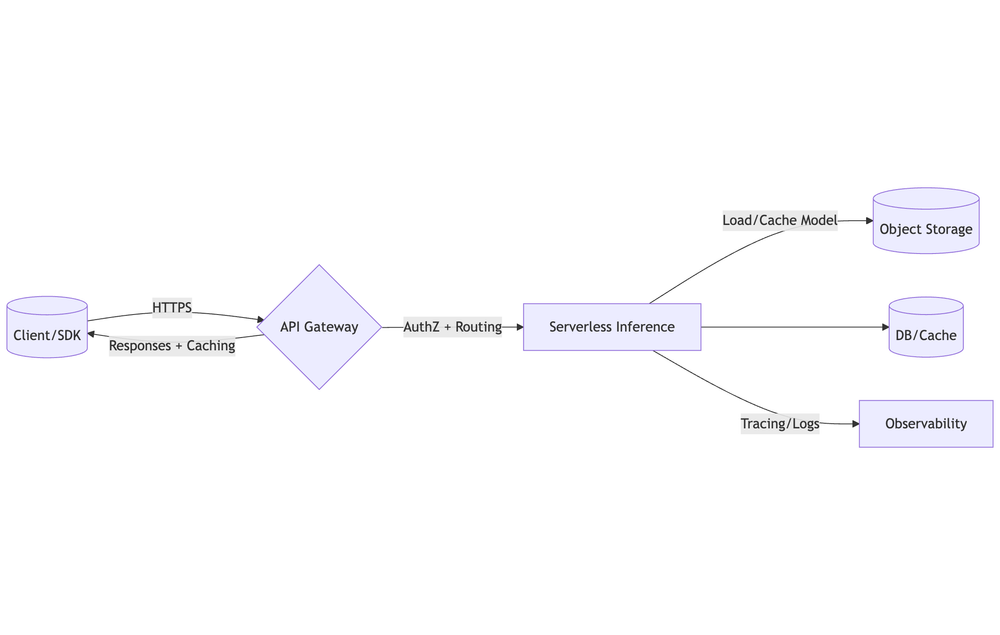
API Gateway Integration
Front your serverless ML inference with managed API gateways.
Design Decisions
- Endpoint shape: POST /v1/infer, GET /v1/health, POST /v1/batch
- Auth: JWT (OIDC), API keys + usage plans, or mTLS
- Payloads: JSON or binary (base64 for images/audio); max size per gateway
- Timeouts: Keep within gateway & function limits (e.g., 30–60s typical)
- Schema: Define OpenAPI (request/response models); return typed errors
- Versioning: /v1 path or header, and staged rollouts (blue/green)
- CORS: Only allow required origins/headers/methods
- Rate limiting & quotas: Prevent abuse; protect downstreams
- Caching: Enable gateway cache for hot GETs; otherwise cache server-side
AWS — API Gateway (HTTP API) + Lambda
# Assume you already created Lambda: ml-infer-img
LAMBDA_ARN="arn:aws:lambda:<region>:<acct>:function:ml-infer-img"

# 1) Create HTTP API
API_ID=$(aws apigatewayv2 create-api \
  --name ml-infer-http \
  --protocol-type HTTP \
  --target $LAMBDA_ARN \
  --query 'ApiId' --output text)

# 2) Deploy stage
aws apigatewayv2 create-stage --api-id $API_ID --stage-name prod --auto-deploy

# 3) URL
URL=$(aws apigatewayv2 get-api --api-id $API_ID --query 'ApiEndpoint' --output text)
echo "$URL"
Testing Endpoints
curl -X POST "$LAMBDA_URL" -H 'Content-Type: application/json' -d '{"inputs":[[1,2,3]]}'

curl -X POST "$(gcloud functions describe ml-infer --region <region> --format='value(serviceConfig.uri)')" \
  -H 'Content-Type: application/json' -d '{"inputs":[[1,2,3]]}'

curl -X POST "https://func-ml-infer.azurewebsites.net/api/infer" \
  -H 'Content-Type: application/json' -d '{"inputs":[[1,2,3]]}'
Cold Start Optimization Strategies
Why Cold Starts Happen
- Runtime init → boot language runtime & function host
- Code import → import packages; run top-level code
- Dependency/materialization → load native libs (e.g., BLAS), JIT, compile regex/tokenizers, etc.
- Model fetch & load → download from storage, deserialize to RAM
- Network attach → VPC/ENI setup, database connections
Optimization Strategies
- Keep deps slim: Choose lighter runtimes (Python/Node), avoid heavyweight ML stacks unless using containers
- Lazy-load models once per instance: Cache in global scope and /tmp (or a mounted volume) for reuse
- Prefer container-based functions for heavy deps; use slim/distroless images
- Enable pre-warm features: Provisioned Concurrency (Lambda), min instances (GCF/Cloud Run), Premium plan (Azure Functions)
- Quantize/prune models (ONNX/TFLite/OpenVINO) to reduce artifact size and load time
- Set memory higher to increase CPU share during init (often reduces end-to-end latency)
Measure First
Expose and log: cold_start (module-level flag), model_loaded_ms, import_ms, handler_ms. Track p50/p95/p99 latencies per route & init duration. Use platform logs/metrics: CloudWatch (Init Duration in REPORT), Cloud Monitoring, App Insights.
Cold-start Flag Pattern (Python)
import time
COLD = True
START_TS = time.time()

def cold():
    global COLD
    if COLD:
        COLD = False
        return True
    return False
Managing Model Storage in S3, GCS & Azure Blob
Recommended Object Layout
models/
  <model-name>/
    versions/
      1.0.0/
        model.onnx           # or .pt/.tflite/.bin
        tokenizer.json       # optional
        manifest.json        # metadata (hashes, io schema)
      1.1.0/
        ...
    current.json             # small pointer → {"version":"1.1.0","sha256":"..."}
Why: Immutable version folders + a small pointer (current.json) lets you atomically promote without changing client code.
Example manifest.json
{
  "name": "resnet50",
  "version": "1.1.0",
  "files": [{"path":"model.onnx","sha256":"<...>","size": 104857600}],
  "framework": "onnxruntime",
  "input": {"name":"input","shape":[1,3,224,224],"dtype":"float32"},
  "created_at": "2025-08-10T12:00:00Z"
}
Security (Least Privilege)
- Grant your serverless identity read-only to just the model prefix
- Keep buckets private; prefer presigned URLs for external provisioning tools
- Enable at-rest encryption (SSE-S3/KMS, GCS CMEK, Azure CMK) + HTTPS only
AWS S3 (IAM policy snippet)
{
  "Version": "2012-10-17",
  "Statement": [
    {"Effect":"Allow","Action":["s3:GetObject"],"Resource":["arn:aws:s3:::my-bucket/models/*"]},
    {"Effect":"Allow","Action":["s3:ListBucket"],"Resource":["arn:aws:s3:::my-bucket"],
     "Condition":{"StringLike":{"s3:prefix":["models/*"]}}}
  ]
}
Performance Tips
- Region affinity: Put storage in the same region as your compute/gateway
- Single large file > many small files
- Increase Lambda ephemeral storage (e.g., 10240 MB) for big models
- Edge caching: Place a CDN (CloudFront/Cloud CDN/Azure CDN) in front of the bucket for faster downloads
🔥 Challenges
- Deploy a small ML model (e.g., sentiment analysis) to AWS Lambda with API Gateway endpoint
- Store model in S3 and load dynamically during Lambda execution
- Implement batch inference using an S3 upload trigger
- Deploy two models in different serverless functions and route requests based on API parameters
- Provisioned concurrency (AWS Lambda)
- Smaller Docker base images for containerized serverless
- Implement logging and metrics with CloudWatch + X-Ray (AWS) or equivalent in GCP/Azure
- Test with sample inputs via HTTP request