 Model Context Protocol (MCP) Explained for MLOps Engineers
MCP standardizes how AI applications connect to tools, data, and resources, eliminating custom one-off integrations. Learning it ensures your AI workflows are portable, secure, and easily scalable across different models, clients, and environments.
Welcome
Hey — I'm Aviraj 👋
MCP standardizes how AI applications connect to tools, data, and resources, eliminating custom one-off integrations. Learning it ensures your AI workflows are portable, secure, and easily scalable across different models, clients, and environments.
🔗 30 Days of MLOps
📖 Previous => Day 24: Agentic AI & Retrieval‑Augmented Generation (RAG)
📚 Key Learnings
- What is Model Context Protocol (MCP)
- Why does MCP exist?
- MCP Architecture
- MCP primitives
- MCP Life Cycle
- MCP Security Best Practices
- Implementing an MCP server
- Using MCP servers
🧠 Learn here
What is Model Context Protocol (MCP)?
The Model Context Protocol (MCP) is an open standard designed to bridge the gap between AI/LLM applications and the external data, services and tools they need.
It's like a USB‑C port for AI applications – just as a universal hardware port allows devices to plug into many types of peripherals, MCP provides a standardized way for AI models to connect to different data sources and tools.
Instead of building bespoke integrations for each application and data source, developers can implement the protocol once and then reuse servers and clients across applications.
Why does MCP exist?
Before MCP, developers had to build separate connectors for every AI application and every data source. The protocol aims to remove this fragmentation by defining a common client–server architecture and a set of primitives that all implementations can follow. The result benefits both users and developers:
- For users: AI applications can access the information and tools people use every day. E.g. MCP allows an AI assistant to read Google Drive documents, understand a codebase on GitHub or send calendar invites via an integration, making assistants far more context‑aware.
- For developers: MCP reduces duplication. An MCP server built for Google Drive can be used by any compliant AI application. Developers focus on the AI experience while reusing shared servers instead of repeatedly creating custom connectors. This open ecosystem approach accelerates innovation and encourages community contributions.
What it's not!
MCP isn't a model, a vector DB, or a framework like LangChain. It's the thin interoperability layer the rest of your stack can plug into!
MCP Architecture
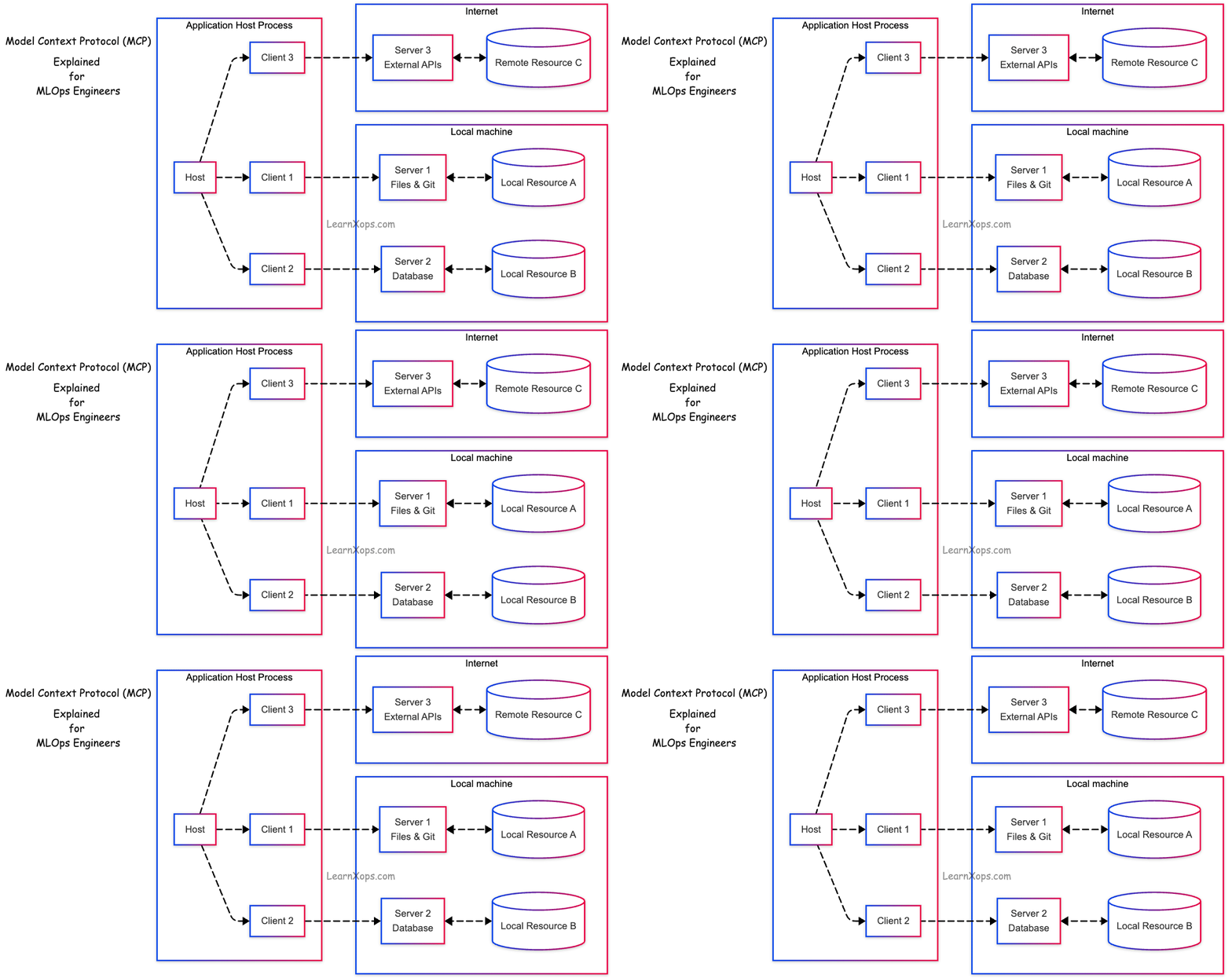
The Model Context Protocol (MCP) follows a client-host-server architecture where each host can run multiple client instances.
This architecture enables users to integrate AI capabilities across applications while maintaining clear security boundaries and isolating concerns.
Built on JSON-RPC, MCP provides a stateful session protocol focused on context exchange and sampling coordination between clients and servers.
- Client (host): The thing your user interacts with (chat UI, IDE, agent runtime). It speaks MCP to servers, exposes tools to the model, and enforces UX and consent
- Server: A process exposing tools (callable operations), resources (files, queries, blobs), prompts/templates, and instructions with JSON schemas and metadata
Host
The MCP host is the AI application (e.g., Claude or an IDE). It creates and controls multiple clients, decides who can connect, applies security rules, handles user permissions, works with AI/LLM integrations, and combines context from all clients into one place.
Example: An MCP host running inside VS Code manages multiple AI-connected clients, each linked to different servers like GitHub MCP Server and Jira MCP Server.
Clients
A client is created by the host to talk to a specific server. Each one has its own private connection, manages communication rules, sends and receives messages, handles updates and notifications, and makes sure data from different servers stays separate.
Example: An MCP client connects the host to a GitHub MCP Server, letting the host list repositories, fetch code snippets, and create issues securely.
Servers
A process exposing tools (callable operations), resources (files, queries, blobs), prompts/templates, and instructions with JSON schemas and metadata, so Servers are basically where the actual tools, data, or context live.
They work independently, share their features through MCP, can ask clients for AI sampling, follow security rules, and can run locally or on remote machines.
Example: A Jira MCP Server runs remotely, exposing ticket data and workflows to the host so an AI assistant can search and update issues directly from the IDE.
MCP spec defines three kinds of servers:
- stdio servers run as a subprocess of your application. You can think of them as running "locally".
- HTTP over SSE servers run remotely. You connect to them via a URL.
- Streamable HTTP servers run remotely using the Streamable HTTP transport defined in the MCP spec.
MCP Primitives
Primitives define what clients and servers can offer each other. On the server side, MCP defines three core primitives:
Server-Side Primitives
- Tools – AI actions. Tools let AI models perform actions such as searching flights, sending messages or creating calendar events. They are defined with JSON Schemas for input and require explicit user approval before execution. The travel example shows how multiple tools – searchFlights, createCalendarEvent and sendEmail – can coordinate complex tasks. Applications must surface tools clearly, request approvals and log all executions for trust and safety. Tools are discovered via
tools/listand executed viatools/call - Resources – context data. Resources expose structured data from files, APIs or databases that models can read and include in their context. Resource templates allow dynamic queries via URI templates (e.g.,
weather://forecast/{city}/{date}). Applications can implement various UI patterns for resource discovery, such as tree views, search and manual selection. - Prompts – interaction templates. Prompts provide reusable workflows and are user‑invoked. For instance, the plan‑vacation prompt guides vacation planning with structured arguments. Prompts are discovered via
prompts/list, fetched viaprompts/get, and executed by the host application. UI patterns include slash commands, command palettes or context menus.
Client-Side Primitives
On the client side, MCP defines primitives that servers can request:
- Sampling – allows a server to request a language model completion from the client's AI model, keeping servers model‑agnostic. Sampling uses a human‑in‑the‑loop flow: the server requests a completion, the client asks the user for approval, sends the prompt to the model, and returns the result to the server. Users review both the request and the result to ensure safety.
- Elicitation – enables servers to ask users for additional information through a structured schema, often used to confirm actions or gather missing details. For example, a server planning a vacation can elicit confirmation and preferences such as seat type or travel insurance.
- Roots – let clients communicate filesystem boundaries (e.g., specific directories) so servers know where they are allowed to operate. Roots help maintain security boundaries and are updated dynamically when users open new directories.
- Logging – servers can send log messages to clients for debugging or monitoring.
These primitives allow a rich and secure interplay between servers and clients, forming the basis for all MCP interactions.
Life Cycle
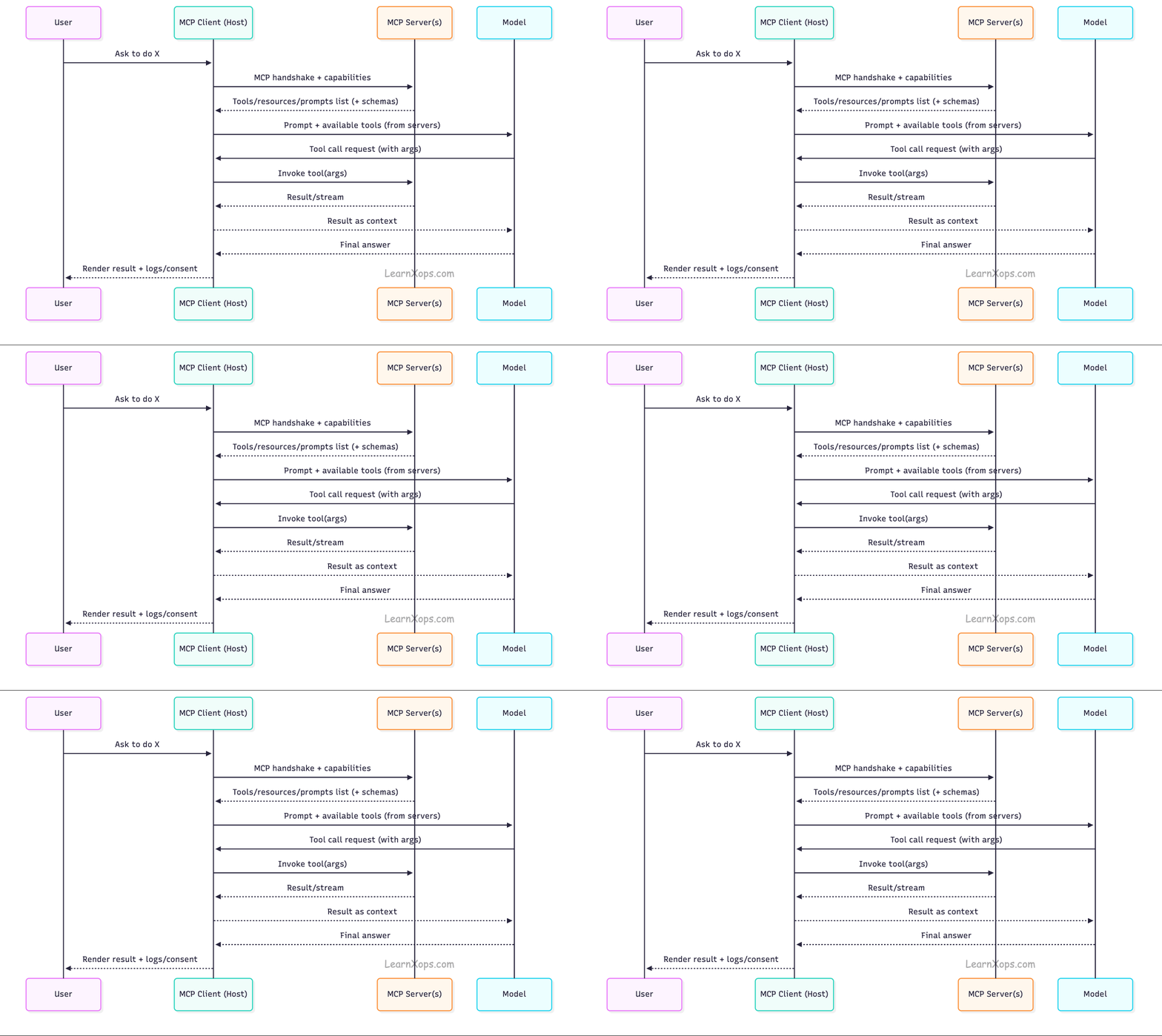
- Connection + Hello: Client and server exchange capabilities, version, protocol revision.
- Discovery: Client fetches tool/resource/prompt registries (names, schemas, descriptions).
- Consent & Selection: Client shows the user what's available; user grants scope-bound consent.
- Invocation: Model chooses a tool; client validates schema, runs it on the server, returns output.
- Streaming & Cancellation: Long-running ops stream partials; client can cancel.
- Audit/Observability: Client logs invocations, inputs, outputs, and user approvals for governance.
Security Best Practices
- Principle of Least Privilege: Scope each server to minimal resources; split high-risk tools into separate servers.
- Explicit Consent: Hosts must show human-readable tool descriptions and require approval before first use (and on scope changes). Treat tool metadata as untrusted: Don't blindly trust tool annotations; validate server authenticity and pin versions.
- AuthN/AuthZ: Use bearer/OAuth tokens or mTLS for remote servers; rotate credentials; never echo secrets to the model. (Anthropic/OpenAI connectors support authenticated MCP.)
- Sandboxing: Run servers in containers with network/file system policies (AppArmor/SELinux, Kubernetes PSP/OPA/Gatekeeper).
- Governance: Keep an allow-list of approved servers; version and sign releases; log all calls for audit (SOX/ISO/GxP).
Where MCP fits in an MLOps stack
- Data & Feature Access: Expose governed readers over data lakes/warehouses (read-only tools + resource streaming) rather than jamming entire documents into prompts.
- Ops & Release: Wrap deployment and rollout actions as tools with change-management gates (e.g., canary/policy checks before deploy_release).
- Eval & Safety: Route outputs through evaluation tools (toxicity, PII detectors, prompt-injection scanners) before surfacing to users.
- Observability: Emit structured logs/traces per tool call; attach request IDs for lineage across agents/pipelines.
- Portability: Swap models or clients without rewriting integrations—keep your interfaces in MCP.
Implementing an MCP server
SDKs and development tools
MCP provides official SDKs for major languages, including TypeScript, Python, Go, Kotlin, Swift, Java, C#, Ruby and Rust. All SDKs support creating servers and clients, choosing transport mechanisms (stdio or HTTP) and enforcing type safety. Developers can choose the SDK that matches their technology stack.
For server developers, the MCP Inspector is an interactive debugging tool. It allows developers to launch servers, inspect available resources, prompts and tools, and monitor messages. The Inspector organizes information into tabs – server connection options, resources, prompts, tools and notifications – and supports iterative testing and edge‑case verification. Best practices include avoiding printing to stdout in stdio servers (use logging libraries) and thoroughly testing error handling.
Simple Example:
# pip install mcp
from mcp import Server, tool
from pydantic import BaseModel

server = Server(name="issues")

class SearchArgs(BaseModel):
    query: str
    project: str | None = None
    limit: int = 10

@tool(name="search_issues", args=SearchArgs, returns=list[dict])
def search_issues(args: SearchArgs):
    # TODO: call your tracker API
    return [{"id": "ISSUE-123", "title": "Login failure", "url": "..."}][:args.limit]

@tool(name="create_issue", args=dict(title=str, body=str), returns=dict)
def create_issue(args: dict):
    # TODO: POST to your tracker
    return {"id": "ISSUE-999", "status": "created"}

if __name__ == "__main__":
    # Serves over stdio by default; add WebSocket/HTTP if desired.
    server.run()
Official MCP filesystem server Example:
from agents.run_context import RunContextWrapper

async with MCPServerStdio(
    params={
        "command": "npx",
        "args": ["-y", "@modelcontextprotocol/server-filesystem", samples_dir],
    }
) as server:
    # Note: In practice, you typically add the server to an Agent
    # and let the framework handle tool listing automatically.
    # Direct calls to list_tools() require run_context and agent parameters.
    run_context = RunContextWrapper(context=None)
    agent = Agent(name="test", instructions="test")
tools = await server.list_tools(run_context, agent)Using MCP servers
You can use the MCPServerStdio, MCPServerSse, and MCPServerStreamableHttp classes to connect to these servers.
MCP servers can be added to Agents. The Agents SDK will call list_tools() on the MCP servers each time the Agent is run. This makes the LLM aware of the MCP server's tools. When the LLM calls a tool from an MCP server, the SDK calls call_tool() on that server.
agent=Agent(
    name="Assistant",
    instructions="Use the tools to achieve the task",
    mcp_servers=[mcp_server_1, mcp_server_2]
)
Tracing
Tracing automatically captures MCP operations, including:
- Calls to the MCP server to list tools
- MCP-related info on function calls
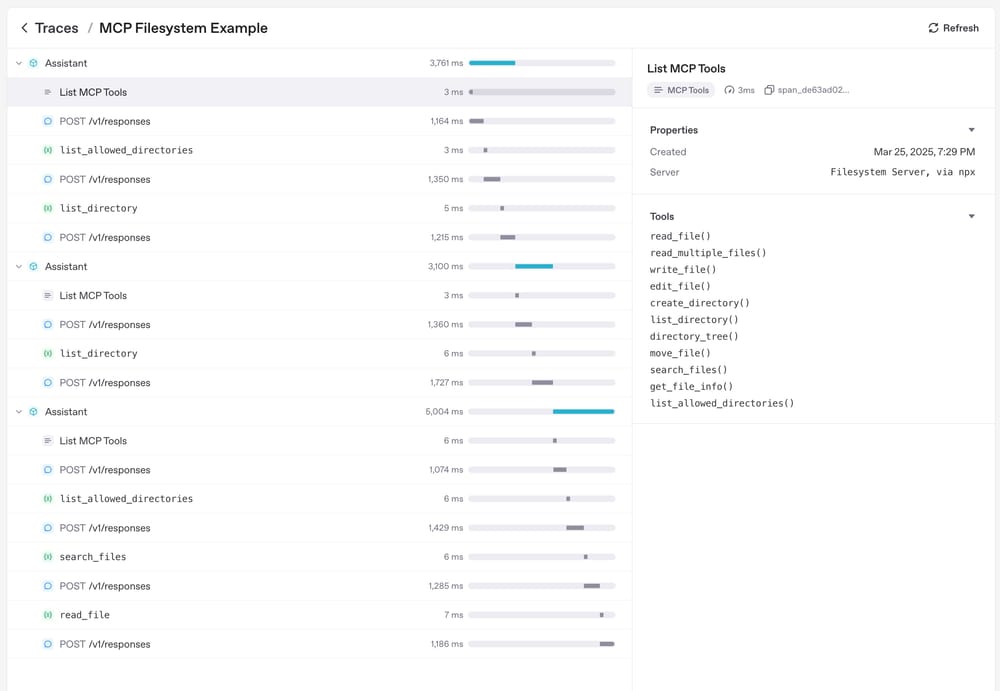
From OpenAI Documentation
🔥 Challenges
- Set Up an MCP Server
Install and configure a basic MCP server locally (e.g., for GitHub or a file system) and verify connectivity with an AI client. - Integrate MCP with a Vector Database
Use MCP to connect an AI client to a vector store (e.g., Pinecone, Weaviate, FAISS) for RAG-style document retrieval in ML workflows. - Implement Secure Authentication in MCP
Configure authentication (API keys, OAuth, or token-based) for an MCP server to protect sensitive ML data. - Deploy MCP in Kubernetes
Containerize your MCP server and deploy it on a local Kind cluster or remote K8s cluster with proper service discovery. - Log & Monitor MCP Interactions
Implement structured logging and monitoring to capture requests/responses between MCP clients and servers for debugging and auditing.