 Agentic AI & Retrieval‑Augmented Generation (RAG)
Build intelligent, context-aware systems that can reason, plan, and dynamically retrieve relevant information for more accurate and grounded responses, enabling production-grade LLM applications with improved reliability, scalability, and real-world usefulness.
Welcome
Hey — I'm Aviraj 👋
We should learn Agentic AI and RAG to build intelligent, context-aware systems that can reason, plan, and dynamically retrieve relevant information for more accurate and grounded responses. This enables production-grade LLM applications with improved reliability, scalability, and real-world usefulness.
🔗 30 Days of MLOps
📖 Previous => Day 23: Managing Large Language Models (LLMs) in Production
📚 Key Learnings
- Understand what Agentic AI is and how it differs from traditional LLM APIs
- Introduction to RAG (Retrieval-Augmented Generation) and why it's useful
- Components of RAG: embedding models, vector stores, retrievers, and generators
- Best practices for scaling and securing RAG + Agent systems in MLOps
🧠 Learn here
Generative models like GPT-4 and LLaMA can generate fluent text but often hallucinate, lack current knowledge, and have no long-term memory. Two complementary strategies are emerging to make these systems more robust in production:
- Agentic AI: Empowers models with reasoning, planning, memory, and tool usage.
- Retrieval-Augmented Generation (RAG): Grounds model outputs in external knowledge sources.
What is Agentic AI?
Agentic AI refers to systems that behave like autonomous agents rather than stateless text generators. Agentic systems observe their environment, reason and plan, remember past interactions, learn from feedback and invoke external tools (e.g. web search or databases) to achieve a goal.
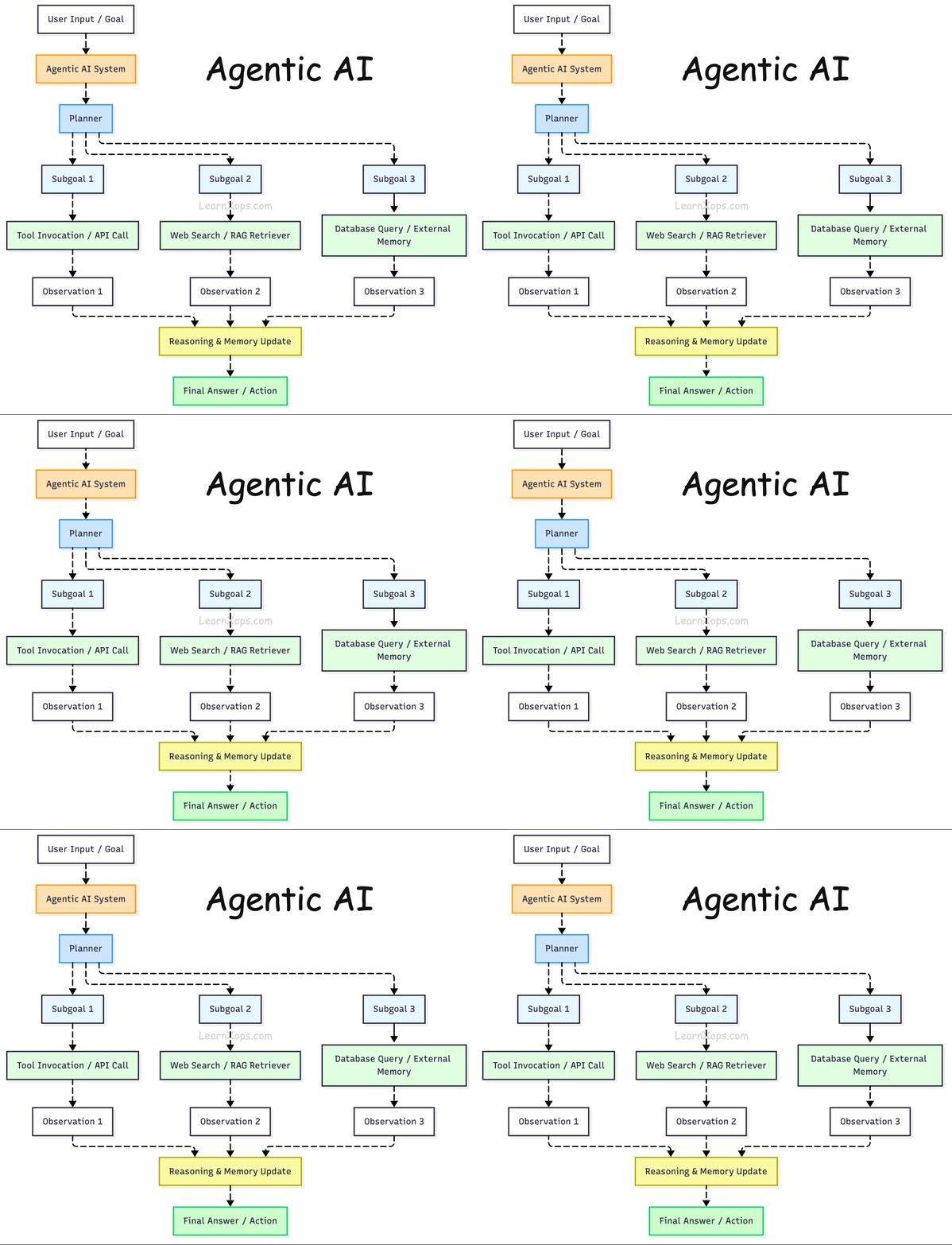
Traditional LLM APIs operate only on the prompt, but an agentic system maintains state across steps, decomposes high‑level tasks into sub‑goals, calls tools iteratively and may collaborate with other agents.
Why agents?
Simple chatbots are limited to single‑step Q&A. Agentic systems can handle multi‑step workflows such as performing research, orchestrating API calls or updating a database.
They also enable dynamic retrieval: instead of retrieving a static set of documents (top‑k similarity), agents can reason about which knowledge base(s) to query and when to fetch new information.
In short, they provide the reasoning and control logic needed to build robust AI assistants and autonomous tools.
Agentic AI Components
| Component | Description | Examples / Tools |
|---|---|---|
| Planner | Breaks down high-level goals into sub-tasks or sub-goals | LangChain Planner, AutoGPT task planner |
| Reasoner | Decides what action to take based on the current state and context | ReAct Pattern, LangChain Reasoning modules |
| Memory | Stores past interactions, tool outputs, and context for long-term coherence | LangChain Memory, Weaviate, Redis, Chroma |
| Tool Invoker / Executor | Executes tools, APIs, or scripts needed to accomplish a task | LangChain Tools, OpenAI Function Calling, Zapier |
| Retriever | Finds relevant context from knowledge base or documents | FAISS, Pinecone, Qdrant, LlamaIndex |
| Environment Interface | Allows the agent to observe and interact with its external environment | API clients, browser automation (Playwright) |
| Agent Loop / Orchestrator | Manages the iteration cycle of observe-plan-act with tool calls and feedback | LangChain AgentExecutor, AutoGPT Core |
| Learning Component | (Optional) Learns from feedback to improve planning and decision-making | RLHF, fine-tuned LLMs, continual learning |
| Toolset / Skill Library | Collection of callable tools or APIs the agent can use | Custom APIs, Python functions, LangChain Tools |
| Output Generator | Generates final human-readable responses or actions | OpenAI GPT-4, Claude, Mistral, LLaMA |
Retrieval‑Augmented Generation (RAG)
RAG combines a generative LLM with an external retrieval system to enhance output accuracy.
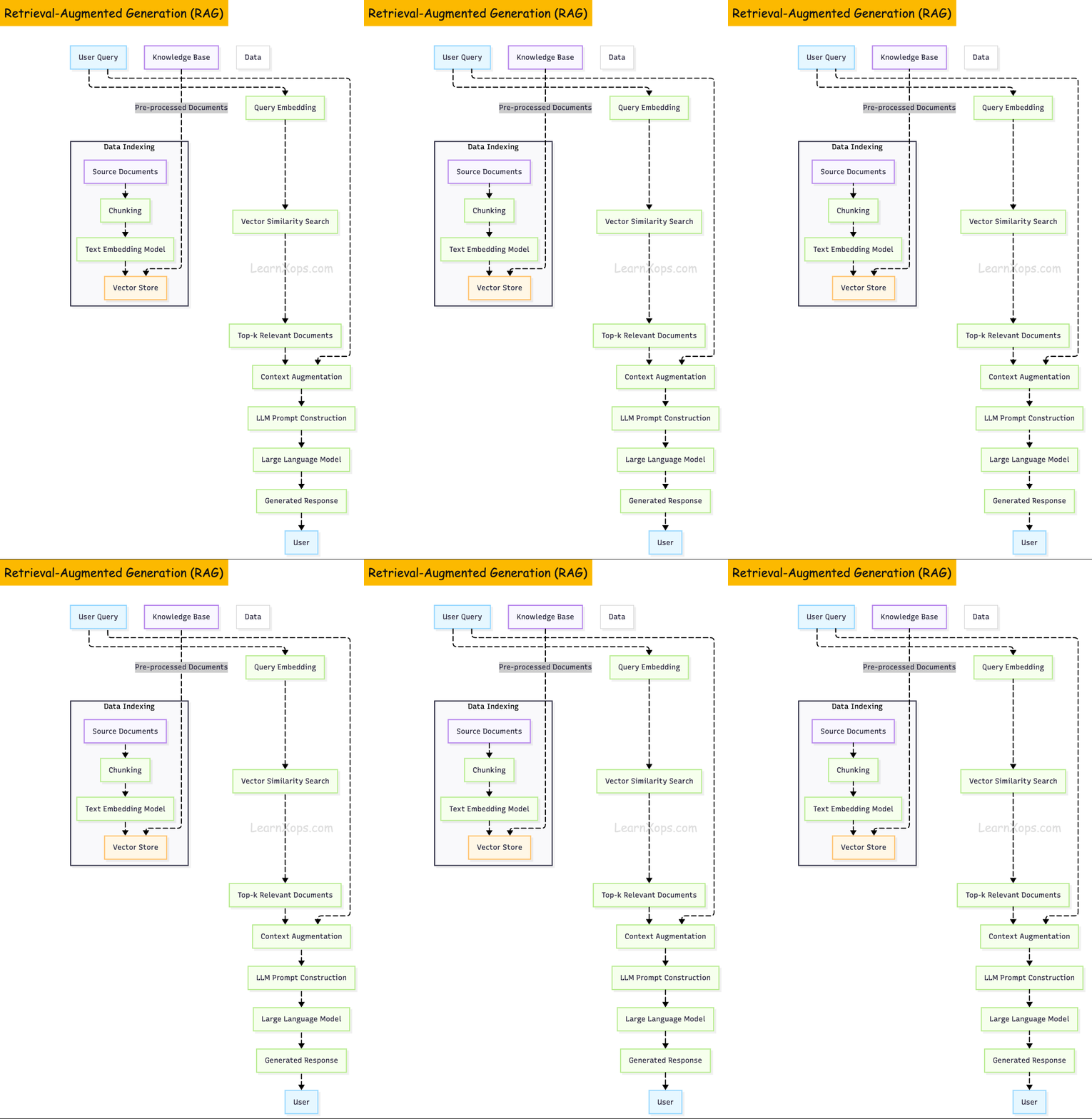
It performs two phases:
- (1) retrieval—selecting relevant documents from a knowledge store
- (2) generation—appending those documents to the prompt and generating a response.
This combination reduces hallucinations and allows models to answer domain‑specific questions without fine‑tuning.
Benchmarks show that RAG can outperform simply enlarging the model's context window; for instance, a RAG‑enabled Llama 4 achieved 78% accuracy on open‑book QA tasks versus 66% when relying on a longer context window alone.
Useful Tools
| Purpose | Tools/Frameworks |
|---|---|
| Agent Frameworks | LangChain, LlamaIndex |
| Embedding Models | all-MiniLM, e5, command-R |
| Vector Databases | Pinecone, Qdrant, Weaviate |
| Hosting LLMs | vLLM, Hugging Face, OpenLLM |
| Monitoring | Prometheus, Grafana, Sentry |
RAG Pipeline
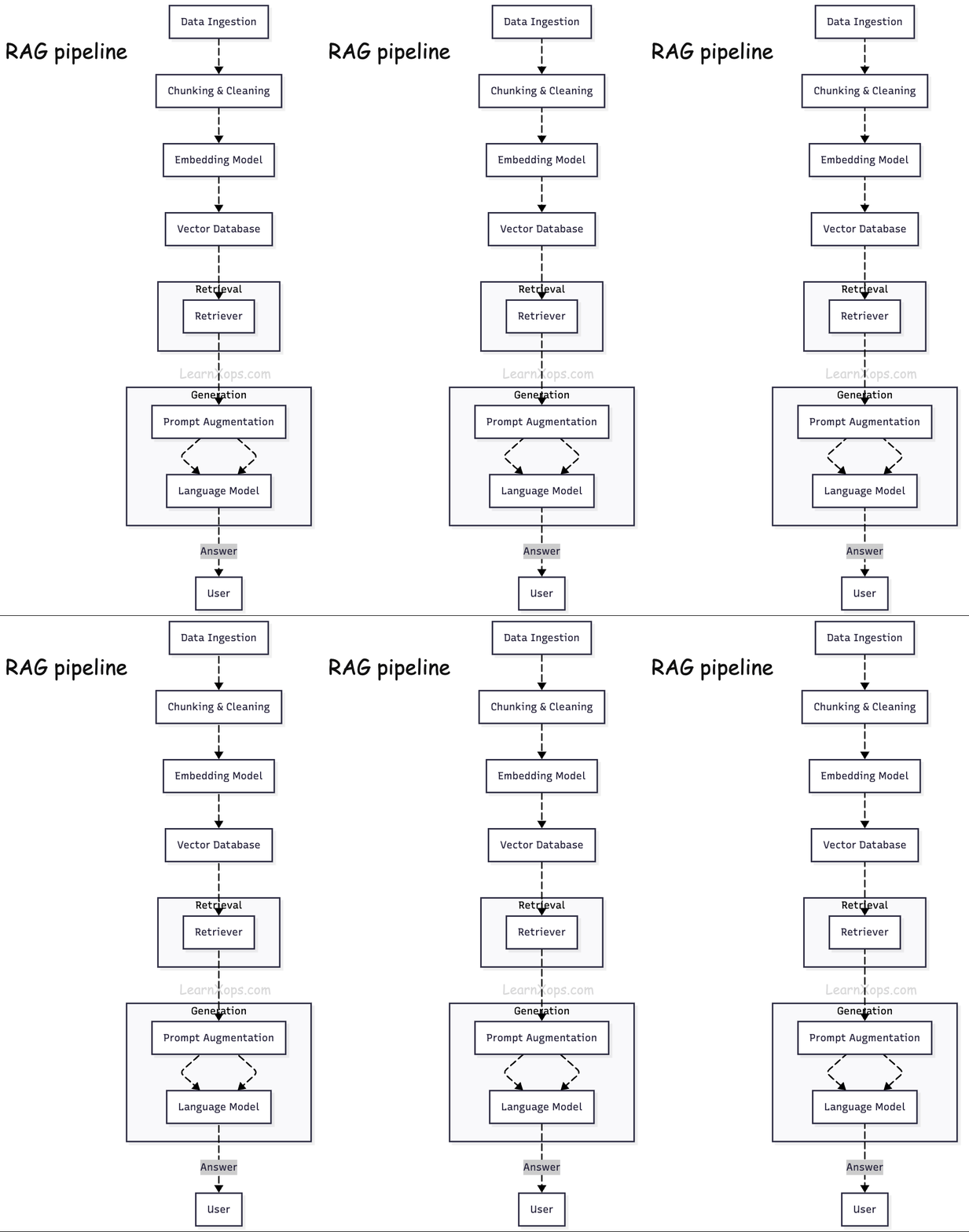
An effective RAG system has several stages:
1. Data ingestion and preprocessing
Documents are loaded (e.g., from PDFs, Git repositories, databases) and split into chunks of suitable size. Chunk size influences retrieval; smaller chunks improve recall but increase the number of embeddings to store.
2. Embedding generation
Each chunk is converted to a high‑dimensional vector via an embedding model. OpenAI's Ada‑002 was popular, but newer models and open‑source alternatives such as e5, all‑MiniLM and Cohere's command‑R embed offer better semantic representation. When choosing an embedder, it's recommended to evaluate semantic performance, retrieval metrics, sequence length (512 tokens or less) and model size/cost.
3. Vector storage
Vectors are persisted in a vector database. Systems like Pinecone, Weaviate, Qdrant and Milvus are designed to perform efficient high‑dimensional similarity search. They offer features such as pre‑filtering, quantization, multi‑tenancy and serverless scaling.
4. Retrieval
Upon receiving a query, its embedding is compared against stored embeddings using similarity metrics (cosine, L2, inner product). Top‑k chunks are returned.
5. Generation
The LLM combines the retrieved documents with the user's query to produce an answer. Proper prompt engineering (e.g., chain‑of‑thought, citations) guides the model to use the provided context.
The following diagram illustrates a typical RAG pipeline:
RAG benefits include improved accuracy and factuality, real‑time relevance, data privacy, and traceability. It is therefore widely adopted; CSIRO's 2025 RAGOps paper notes that about 60% of enterprise LLM systems incorporate RAG.
Beyond naive RAG: Agentic retrieval
Early RAG systems simply stored document chunks in a vector store and returned the k most similar chunks (naïve top‑k retrieval), but this approach is insufficient for complex tasks.
Introducing agentic retrieval strategies: models can classify the query, decide which retrieval mode to use (e.g., per‑chunk search vs. file‑based retrieval), route the query to specialised indexes and combine results from multiple sources. A composite retriever can automatically choose between dense, keyword or metadata‑based retrieval and merge outputs. This ability to adapt retrieval strategies gives agents richer context with less noise.
RAG versus Agentic RAG versus MCP
| System | Autonomy & memory | Tool use | Complexity & use‑cases |
|---|---|---|---|
| RAG | Retrieves relevant documents but is passive; no reasoning or long‑term memory | Does not plan or use external tools | Best for single‑turn chatbots and search assistants; easy to deploy |
| Agentic RAG | Maintains goal‑driven reasoning, plans steps and can access memory; supports multi‑step tasks | Can call tools (web search, calculators, APIs), reflect on results and iterate | Suitable for research agents, internal assistants and workflows; harder to debug |
| Model Context Protocol (MCP) | Fully autonomous agent framework with persistent state and context tracking | Coordinates multiple agents and tools | Used in enterprise AI requiring robust long‑term workflows and strict governance |
Agentic RAG thus sits between simple retrieval and fully autonomous frameworks: it augments RAG with planning and tool use but without the full infrastructure overhead of MCP.
Choosing embeddings, retrievers and vector stores
An effective RAG workflow requires careful selection of models and databases:
- Embeddings: Modern choices include proprietary models (OpenAI's text‑embedding‑3 large, Cohere command‑R embed) and competitive open‑source models (e5‑base, all‑MiniLM).
- Retrievers: Dense retrievers use vector similarity, while hybrid retrievers combine vector search with keyword search to balance recall and precision. Agentic retrieval systems often combine multiple retrievers and use an LLM to route queries.
- Vector databases: Choose based on performance, cost and operational needs. For example, Pinecone offers serverless scaling and low‑latency search; Weaviate provides GraphQL and optional embedding modules; Qdrant supports pre‑filters and multi‑tenancy.
- Frameworks and libraries: Open‑source frameworks like LangChain, LlamaIndex and Haystack provide modular components for chunking, embedding, indexing, retrieval and prompt construction. Cloud providers offer managed RAG solutions with integrated vector stores and embedding APIs.
Caching and memory in RAG pipelines
Serving RAG at scale is costly because every query triggers vector search and LLM generation. Caching exploits redundancy to reduce latency and cost.
Semantic caches
Semantic caches store past question–answer pairs as vectors in a fast database. The Redis RAG Workbench demonstrates this approach: enabling the semantic cache writes each Q&A pair to a Redis vector index.
When a new query is semantically similar to a cached one (based on a configurable distance threshold), the cached response is returned without calling the LLM.
Research cited by the workbench team suggests that up to 31% of LLM calls are redundant, and semantic caching can eliminate them, leading to faster responses and zero cost. Developers can adjust the similarity threshold to trade off recall and precision.
RAGCache: caching intermediate states
For GPU‑bound inference, RAGCache proposes storing intermediate key–value tensors of retrieved documents in a hierarchical cache. The system organises these states in a knowledge tree and places frequently accessed documents in fast GPU memory while moving less popular ones to host memory.
A prefix‑aware Greedy‑Dual‑Size‑Frequency (PGDSF) replacement policy considers document order, size, frequency and recency to minimise cache misses.
RAGCache also overlaps vector retrieval (CPU) and LLM inference (GPU) via dynamic speculative pipelining, reducing end‑to‑end latency. Experiments show that RAGCache cuts time‑to‑first‑token by up to 4× and improves throughput by up to 2.1× compared with vLLM with Faiss.
Approximate caches
The Proximity cache intercepts queries before they reach the vector database. It stores embeddings of previous queries as keys and their retrieved documents as values.
When a new query is sufficiently similar to a stored key, the cached documents are reused, avoiding a new vector search.
This approximate caching reduces retrieval latency by up to 59% while maintaining accuracy. Proximity analyses the trade‑off between cache capacity and similarity threshold to balance speed and recall.
Caching therefore adds a memory layer to RAG, allowing the system to learn from past interactions and reducing redundant operations.
Observability and metrics
RAG pipelines involve multiple micro‑services (embedding models, vector stores, LLMs) and hidden external calls.
Observability is critical to control latency, cost and quality. A Dynatrace tutorial shows how to instrument a LangChain RAG pipeline with OpenTelemetry.
It measures the number of input/output tokens, tracks latency per component and collects metrics using the gen_ai semantic convention. We can then build dashboards to monitor token consumption, retrieval latency and error rates.
Complementing low‑level tracing, teams also need higher‑level evaluation metrics. It's recommended to divide metrics into accuracy (uncertainty, correctness, mean reciprocal rank), context adherence and completeness (how well the response uses retrieved context) and system metrics (latency per component).
To improve responsiveness, we can use strategies such as measuring end‑to‑end latency, segmenting large embeddings, using hybrid search and employing advanced indexing like FAISS.
We should monitor both retrieval quality metrics (e.g., precision@k, recall@k, context sufficiency) and generation quality metrics (answer relevance, faithfulness, hallucination rate). Tools like RAGAS automate such evaluations.
Maintaining RAG systems
Curating data and refresh pipelines
A common failure mode is dumping all available data into the vector store. We can maintain separate vector stores for external (public) and internal (sensitive) data. RAG systems also need a robust refresh pipeline; incremental updates (like a Git diff) ensure that the knowledge base stays current without re‑indexing everything. Pipeline components include change detection, validation checks, incremental indexing and version control.
Evaluation and prompt design
Evaluating RAG outputs requires automated metrics. RAGAS computes faithfulness, answer relevance and context relevance to measure how well responses stick to the provided context. Prompt engineering influences retrieval; use context‑aware prompts, include system instructions and ask the model to cite sources.
Security and responsible AI
Production RAG systems must be secured against multiple threats. Two common risk factors are prompt injection and hallucination. There are three mitigation pillars:
- PII detection & masking: Users may inadvertently include API keys, emails or customer data in their queries. The system should identify and redact personally identifiable information before storing prompts.
- Bot protection & rate limiting: Unprotected endpoints can be hammered with automated requests that both increase cost and attempt to extract sensitive information. Apply rate limits, reCAPTCHA and request validation.
- Access controls: Separate public and internal data stores and enforce role‑based access control to prevent accidental leakage of internal documentation.
NVIDIA's security guidelines complement these practices by describing threats that apply to all LLM‑enabled applications.
Key vulnerabilities include prompt injection, information leaks (training or runtime data being extracted) and LLM unreliability. It advises establishing trust boundaries: treat LLM outputs as untrusted, parameterize plug‑ins (limit actions), sanitise inputs, require explicit user authorization for sensitive operations and avoid including secrets (passwords, API keys) in prompts. Sensitive data should not be used to train the model; if needed, store it in a separate retrieval store and rely on RAG rather than fine‑tuning.
Putting it all together: best‑practice blueprint
Successful RAG deployments share common patterns:
- Start small: begin with one or two high‑value use‑cases and a curated knowledge base.
- Automate refresh and evaluation: use pipelines to monitor document changes and incrementally update the vector store; evaluate quality continuously with metrics like RAGAS.
- Use caching: implement semantic caches (Redis, RAGCache, Proximity) to reduce redundant LLM calls.
- Instrument and monitor: collect telemetry on token usage, latency, retrieval hits/misses, and cost.
- Secure by design: implement input sanitization, PII redaction, rate limiting and role‑based access control.
🔥 Challenges
- Use a Hugging Face model like distilGPT2 or flan-t5-small to generate output
- Run quantized LLM using bitsandbytes or AutoGPTQ
- Deploy the model as a container using vLLM or OpenLLM on local Docker
- Enable batching for inference to handle multiple requests
- Fine-tune a small LLM using LoRA + PEFT with your own dataset
- Set up CI/CD pipeline to auto-update a deployed LLM model (GitHub Actions + Hugging Face repo or S3)
- Add observability: track latency, input length, token count per request
- Deploy LLM inference to GPU-backed Kubernetes pod (EKS/GKE) using Ray Serve or KServe
- Write and test 5 different prompts and compare responses
- Log prompt + response to file or JSON store