Day 26: Project: End-to-End MLOps Pipeline
30 Days of MLOps Challenge
Welcome
Hey — I'm Aviraj 👋
In this project you will learn how to build a complete production-ready machine learning pipeline with containerized microservices architecture, implementing end-to-end monitoring using Prometheus metrics integration and Grafana dashboards for real-time observability of model performance, API health, and system resources.
This project demonstrates critical MLOps skills including Docker orchestration with docker-compose, FastAPI model serving with custom Prometheus middleware for tracking HTTP requests and model predictions, MLflow experiment tracking while maintaining data persistence and proper configuration management across development and production environments.
🔗 New to MLOps? Check out => 30 Days of MLOps
Project: End-to-End MLOps Pipeline
Let's understand the project first!
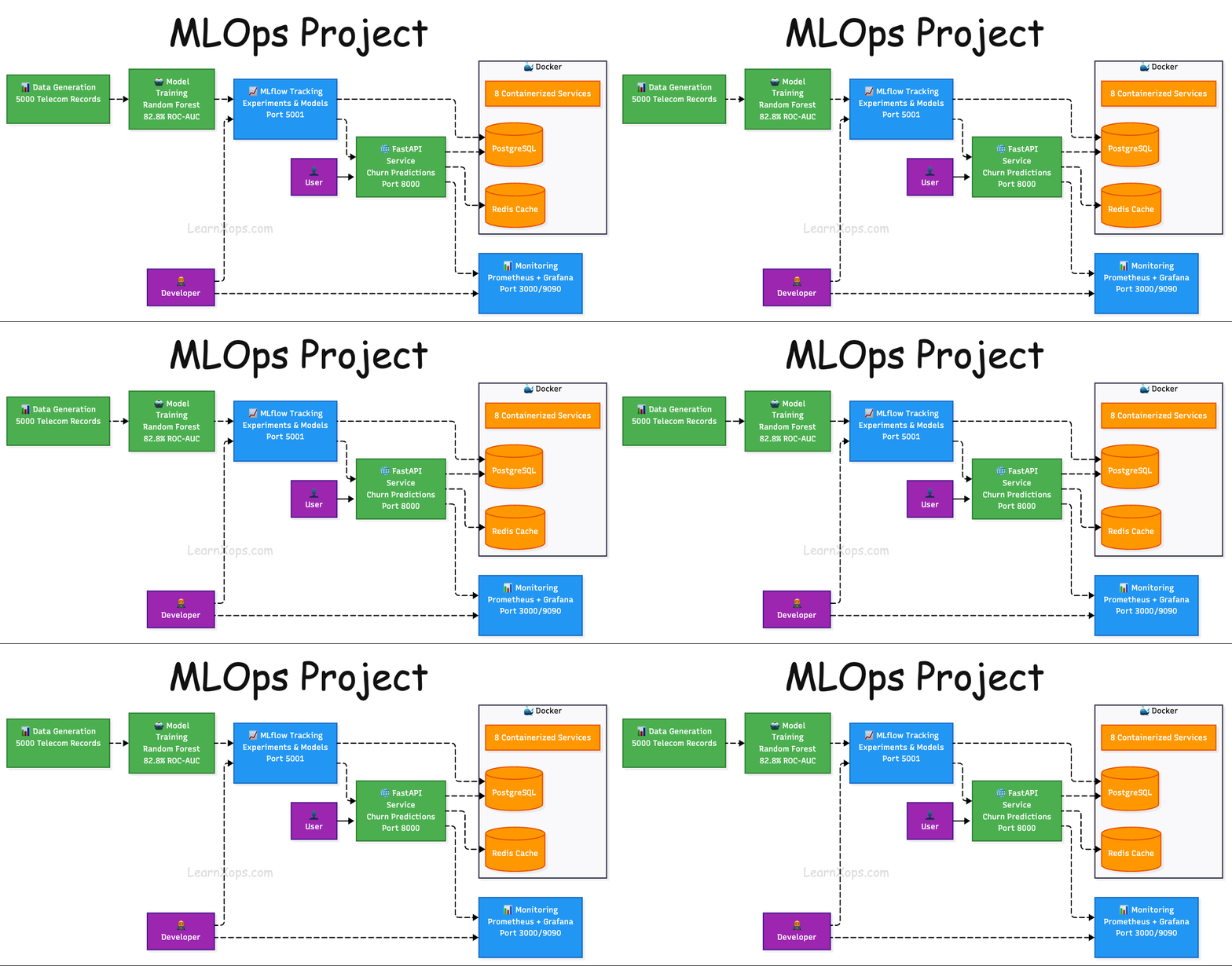
This project demonstrates a complete MLOps workflow for a Customer Churn Prediction use case.
What is Customer Churn Prediction?
Customer Churn Prediction is the process of identifying which customers are likely to stop using a company's product or service within a certain period.
In simple terms, "churn" means a customer leaves — cancels their subscription, switches to a competitor, or stops making purchases. Churn prediction uses historical data (e.g., usage patterns, support interactions, purchase history, demographics) and machine learning/statistical models to forecast the likelihood of each customer leaving.
Key points:
- Goal: Retain customers by detecting churn risks early.
- Data used: Past purchase behavior, customer service tickets, engagement frequency, feedback scores, billing issues, etc.
- Techniques: Logistic regression, decision trees, random forests, gradient boosting, neural networks.
- Outcome: A churn probability score for each customer, helping businesses take preventive actions (e.g., special offers, personalized outreach).
This project performs telecommunications/telecom customer churn prediction, which predicts whether a customer will cancel their phone, internet, or cable services.
The model analyzes customer features like demographics (age, gender), service usage (phone service, internet type, streaming services), contract details (monthly vs yearly contracts, payment methods), and billing information (monthly charges, total charges, paperless billing) to predict the probability of a customer leaving the telecom company.
For example, customers with month-to-month contracts, high monthly charges, electronic check payments, and fiber optic internet with streaming services tend to have higher churn probabilities, while customers with longer-term contracts and automatic payment methods typically show lower churn risk.
Let's get started!
This project has:
- Data Generator: Automated data generation, ingestion, validation, and preprocessing
- Model Development: Experiment tracking, model training, and evaluation
- Model Deployment: Containerized model serving with REST API
- Monitoring: Model performance monitoring and drift detection
- CI/CD: Automated testing and deployment pipelines
- Infrastructure: Docker containerization and orchestration
📁 Project Structure
mlops_project/
├── 📋 Makefile                     # Build automation and commands
├── 📄 README.md                    # Project documentation
├── 🐳 docker-compose.yml           # Multi-container orchestration
├── 📦 requirements.txt             # Python dependencies
├── ⚙️ setup.py                     # Package configuration
├── 🔧 .env / .env.example          # Environment variables
├── 🗄️ mlops.db                     # SQLite database
│
├── 📂 src/                         # Main source code
│   ├── 🌐 api/                     # FastAPI application
│   │   ├── app.py                  # Main API with Prometheus metrics
│   │   └── schemas.py              # Pydantic data models
│   ├── 📊 data/                    # Data processing modules
│   │   ├── ingestion.py            # Data loading and generation
│   │   └── validation.py           # Data quality checks
│   ├── 🤖 models/                  # ML model components
│   │   ├── train.py                # Model training with MLflow
│   │   ├── predict.py              # Model inference
│   │   └── evaluate.py             # Model evaluation
│   ├── 📈 monitoring/              # Observability components
│   │   ├── performance.py          # Performance tracking
│   │   └── drift.py                # Data drift detection
│   └── 🛠️ utils/                   # Utility modules
│       ├── database.py             # Database operations
│       ├── helpers.py              # Helper functions
│       └── logger.py               # Logging configuration
│
├── 📂 config/                      # Configuration files
│   ├── config.yaml                 # Main application config
│   ├── model_config.yaml           # ML model parameters
│   └── logging.yaml                # Logging configuration
│
├── 🐳 docker/                      # Docker configurations
│   ├── Dockerfile.api              # API service container
│   ├── Dockerfile.training         # Training service container
│   └── Dockerfile.monitoring       # Monitoring service container
│
├── 📊 monitoring/                  # Monitoring stack
│   ├── prometheus.yml              # Prometheus configuration
│   └── grafana/                    # Grafana setup
│       ├── dashboards/             # Dashboard definitions
│       │   ├── mlops-dashboard.json    # Main MLOps dashboard
│       │   ├── prometheus-metrics.json # System metrics dashboard
│       │   └── dashboard.yml       # Dashboard provisioning
│       └── datasources/            # Data source configs
│           └── prometheus.yml      # Prometheus data source
│
├── 📜 scripts/                     # Automation scripts
│   ├── generate_data.py            # Data generation script
│   └── run_pipeline.py             # Pipeline execution
│
├── 📓 notebooks/                   # Jupyter notebooks
│   └── 01_data_exploration.ipynb   # Data analysis notebook
│
├── 🧪 tests/                       # Test suite
│   ├── conftest.py                 # Test configuration
│   └── unit/                       # Unit tests
│       └── test_data_validation.py # Data validation tests
│
├── 📂 data/                        # Data storage
├── 📂 models/                      # Trained model artifacts
├── 📂 mlruns/                      # MLflow experiment tracking
├── 📂 logs/                        # Application logs
├── 📂 metrics/                     # Performance metrics
└── 🐍 venv/                        # Python virtual environment
Prerequisites
- Python 3.8+
- MLFlow
- Docker & Docker Compose
- Git
- make
Installation
Clone:
git clone https://github.com/sd031/mlops-pipeline.git
cd mlops_project
Install all prerequisites, especially "make". make comes preinstalled with mac, but, make the installation is super easy.
If you are using Ubuntu:
sudo apt update
sudo apt install build-essential
For Windows, use Chocolatey:
choco install makeSet up & Configure the environment:
make set-upStart MLFlow Tracking Server
make mlflow-serverGenerate sample data:
make generate-dataRun the complete pipeline:
make run-pipeline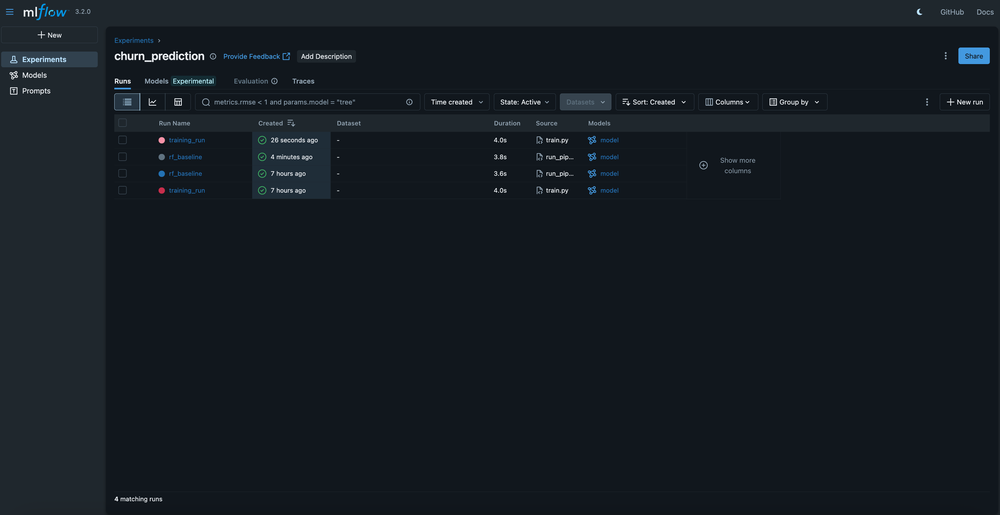
Usage
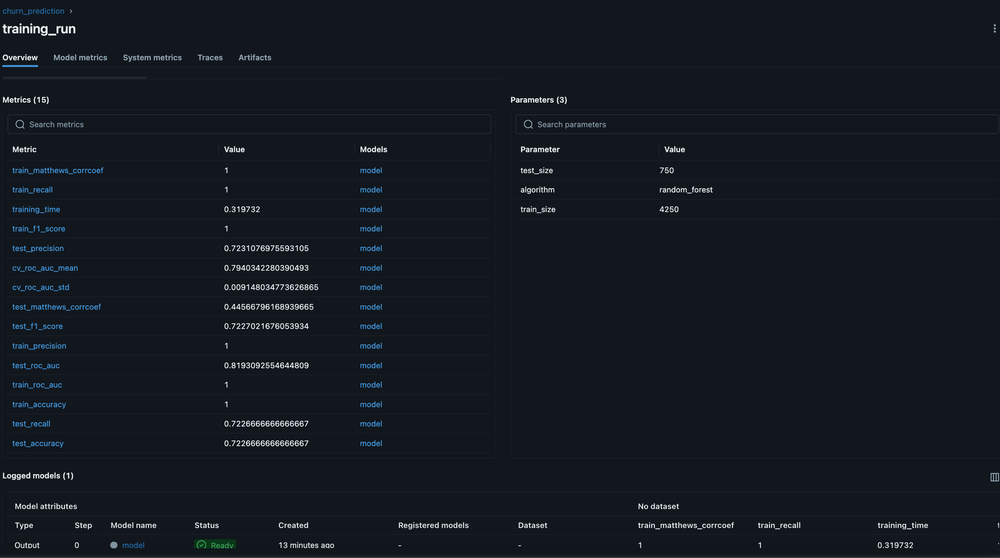
Model Training
make train-modelExample output:
make train-model
./venv/bin/python -m src.models.train --config config/model_config.yaml
2025-08-09 17:37:58,448 - __main__ - INFO - Loading data from data/processed/validated_data.csv
2025-08-09 17:37:58,457 - __main__ - INFO - Data split - Train: 4250, Test: 750
2025-08-09 17:37:58,459 - __main__ - INFO - Training random_forest model...
2025-08-09 17:38:00,319 - mlflow.models.model - WARNING - `artifact_path` is deprecated. Please use `name` instead.
2025-08-09 17:38:00,384 - mlflow.types.type_hints - WARNING - Union type hint with multiple non-None types is inferred as AnyType, and MLflow doesn't validate the data against its element types.
2025-08-09 17:38:00,385 - mlflow.types.type_hints - WARNING - Union type hint is inferred as AnyType, and MLflow doesn't validate the data against its element types.
2025-08-09 17:38:00,385 - mlflow.types.type_hints - WARNING - Union type hint with multiple non-None types is inferred as AnyType, and MLflow doesn't validate the data against its element types.
2025-08-09 17:38:02,546 - mlflow.models.model - WARNING - Model logged without a signature and input example. Please set `input_example` parameter when logging the model to auto infer the model signature.
2025-08-09 17:38:02,562 - src.utils.database - INFO - Logged metrics for model random_forest v20250809_173800
2025-08-09 17:38:02,562 - __main__ - INFO - Model training completed
2025-08-09 17:38:02,562 - __main__ - INFO - Model training completed successfully
2025-08-09 17:38:02,563 - __main__ - INFO - Test ROC-AUC: 0.8201
2025-08-09 17:38:02,563 - __main__ - INFO - Model saved to: models/artifacts/random_forest_20250809_173800.pkl
Model trained successfully: models/artifacts/random_forest_20250809_173800.pkl
Model Serving
make serve-modelExample output:
make serve-model
./venv/bin/python -m uvicorn src.api.app:app --host 0.0.0.0 --port 8000 --reload
INFO:     Will watch for changes in these directories: ['/Users/sandipdas/mlops_project']
INFO:     Uvicorn running on http://0.0.0.0:8000 (Press CTRL+C to quit)
INFO:     Started reloader process [1802] using WatchFiles
/Users/sandipdas/mlops_project/venv/lib/python3.13/site-packages/pydantic/_internal/_config.py:373: UserWarning: Valid config keys have changed in V2:
* 'schema_extra' has been renamed to 'json_schema_extra'
  warnings.warn(message, UserWarning)
2025-08-09 17:48:32,967 - uvicorn.error - INFO - Started server process [1808]
2025-08-09 17:48:32,967 - uvicorn.error - INFO - Waiting for application startup.
2025-08-09 17:48:32,971 - src.api.app - INFO - Configuration loaded successfully
2025-08-09 17:48:32,972 - src.utils.database - INFO - Database initialized successfully
2025-08-09 17:48:32,972 - src.api.app - INFO - Database initialized
2025-08-09 17:48:33,736 - src.models.predict - INFO - Model loaded successfully: models/artifacts/random_forest_20250809_174733.pkl
2025-08-09 17:48:33,736 - src.api.app - INFO - Model predictor initialized
2025-08-09 17:48:33,736 - src.api.app - INFO - Monitoring components initialized
2025-08-09 17:48:33,736 - src.api.app - INFO - API startup completed successfully
2025-08-09 17:48:33,736 - uvicorn.error - INFO - Application startup complete.
Run Single Prediction:
curl -X POST "http://localhost:8000/predict" \
  -H "Content-Type: application/json" \
  -d '{
    "customer_id": "metrics_test_001",
    "gender": "Female",
    "age": 35,
    "tenure": 12,
    "phone_service": 1,
    "multiple_lines": 1,
    "internet_service": "Fiber optic",
    "online_security": 0,
    "online_backup": 1,
    "device_protection": 0,
    "tech_support": 0,
    "streaming_tv": 1,
    "streaming_movies": 1,
    "contract": "Month-to-month",
    "paperless_billing": 1,
    "payment_method": "Electronic check",
    "monthly_charges": 85.0,
    "total_charges": 1020.0
  }'

#output
{"customer_id":"metrics_test_001","prediction":1,"probability":0.8518423287151119,"model_version":"random_forest_20250809_092557","timestamp":"2025-08-09T17:49:59.477095"}%
Run Batch Prediction:
curl -X POST "http://localhost:8000/predict/batch" \
  -H "Content-Type: application/json" \
  -d '{
    "predictions": [
      {
        "customer_id": "batch_metrics_001",
        "gender": "Male",
        "age": 40,
        "tenure": 20,
        "phone_service": 1,
        "multiple_lines": 1,
        "internet_service": "DSL",
        "online_security": 1,
        "online_backup": 1,
        "device_protection": 1,
        "tech_support": 1,
        "streaming_tv": 0,
        "streaming_movies": 0,
        "contract": "Two year",
        "paperless_billing": 0,
        "payment_method": "Bank transfer (automatic)",
        "monthly_charges": 50.0,
        "total_charges": 1000.0
      },
      {
        "customer_id": "batch_metrics_002",
        "gender": "Female",
        "age": 28,
        "tenure": 4,
        "phone_service": 1,
        "multiple_lines": 0,
        "internet_service": "Fiber optic",
        "online_security": 0,
        "online_backup": 0,
        "device_protection": 0,
        "tech_support": 0,
        "streaming_tv": 1,
        "streaming_movies": 1,
        "contract": "Month-to-month",
        "paperless_billing": 1,
        "payment_method": "Electronic check",
        "monthly_charges": 95.0,
        "total_charges": 380.0
      }
    ]
  }'

#output
{"predictions":[{"customer_id":"batch_metrics_001","prediction":0,"probability":0.09313166514038004,"model_version":"random_forest_20250809_092557","timestamp":"2025-08-09T17:50:42.816117"},{"customer_id":"batch_metrics_002","prediction":1,"probability":0.9135088725812315,"model_version":"random_forest_20250809_092557","timestamp":"2025-08-09T17:50:42.816132"}],"batch_id":"653e1610-f46c-4e48-9e71-3cfd4387d5db","total_predictions":2,"processing_time":0.005399942398071289}%
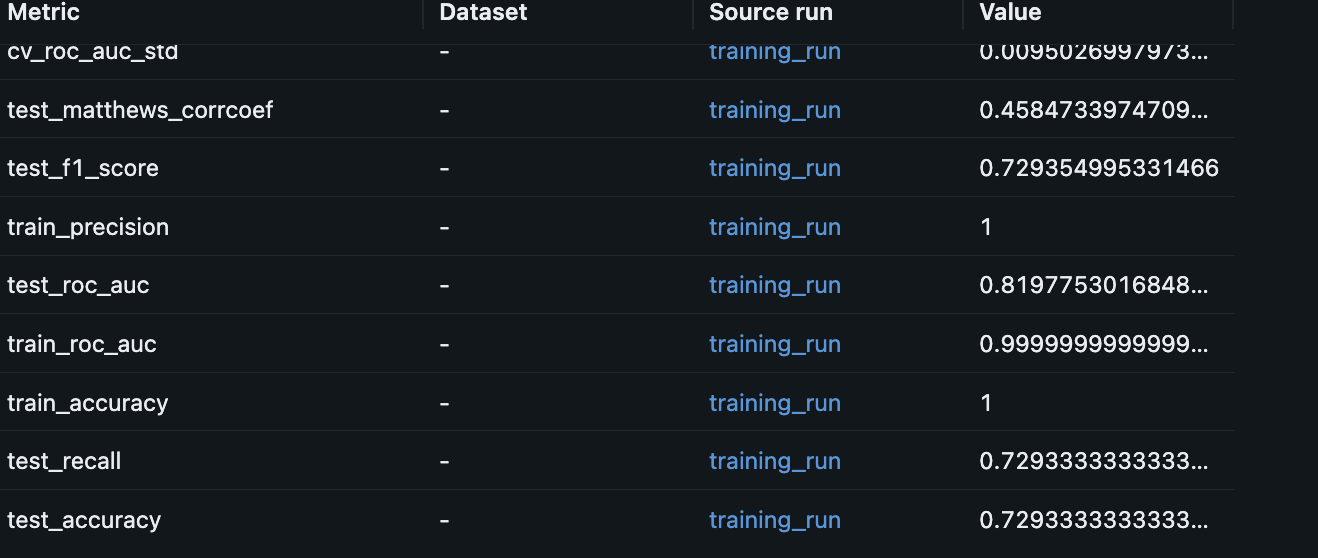
Evaluate Model
make evaluate-modelExample output:
make evaluate-model
./venv/bin/python -m src.models.evaluate
2025-08-09 17:56:40,184 - __main__ - INFO - Loaded model: models/artifacts/random_forest_20250809_174733.pkl
2025-08-09 17:56:40,184 - __main__ - INFO - Model evaluation completed successfully
Model evaluation completed: models/artifacts/random_forest_20250809_174733.pkl
Check in MLFlow Model Run Details Metric Section
Monitor Drift Detection & Performance
make monitorExample output:
make monitor
./venv/bin/python -m src.monitoring.performance &
./venv/bin/python -m src.monitoring.drift &
➜  mlops_project git:(main) 2025-08-09 18:40:34,475 - __main__ - INFO - Retrieved performance metrics for period: 24h
2025-08-09 18:40:34,475 - __main__ - INFO - Drift detection completed: False
2025-08-09 18:40:34,475 - __main__ - INFO - Performance metrics: {'accuracy': 0.85, 'precision': 0.82, 'recall': 0.78, 'f1_score': 0.8, 'roc_auc': 0.88, 'prediction_count': 1250, 'avg_latency': 0.045, 'error_rate': 0.002}
Drift detection result: {'drift_detected': False, 'drift_score': 0.05, 'threshold': 0.1, 'affected_features': [], 'timestamp': datetime.datetime(2025, 8, 9, 18, 40, 34, 475536)}
Testing
make testExample output:
make test
./venv/bin/python -m pytest tests/ -v --cov=src --cov-report=html
================================================= test session starts =================================================
platform darwin -- Python 3.13.5, pytest-8.4.1, pluggy-1.6.0 -- /Users/sandipdas/mlops_project/venv/bin/python
cachedir: .pytest_cache
rootdir: /Users/sandipdas/mlops_project
plugins: Faker-37.5.3, anyio-4.10.0, cov-6.2.1, mock-3.14.1, typeguard-4.4.4
collected 3 items

tests/unit/test_data_validation.py::test_schema_validation PASSED                                               [ 33%]
tests/unit/test_data_validation.py::test_data_quality_validation PASSED                                         [ 66%]
tests/unit/test_data_validation.py::test_target_distribution_validation PASSED                                  [100%]

================================================== warnings summary ===================================================
venv/lib/python3.13/site-packages/pythonjsonlogger/jsonlogger.py:11
  /Users/sandipdas/mlops_project/venv/lib/python3.13/site-packages/pythonjsonlogger/jsonlogger.py:11: DeprecationWarning: pythonjsonlogger.jsonlogger has been moved to pythonjsonlogger.json
    warnings.warn(

src/utils/database.py:17
  /Users/sandipdas/mlops_project/src/utils/database.py:17: MovedIn20Warning: The ``declarative_base()`` function is now available as sqlalchemy.orm.declarative_base(). (deprecated since: 2.0) (Background on SQLAlchemy 2.0 at: https://sqlalche.me/e/b8d9)
    Base = declarative_base()

-- Docs: https://docs.pytest.org/en/stable/how-to/capture-warnings.html
=================================================== tests coverage ====================================================
__________________________________ coverage: platform darwin, python 3.13.5-final-0 ___________________________________

Coverage HTML written to dir htmlcov
============================================ 3 passed, 2 warnings in 0.45s ============================================
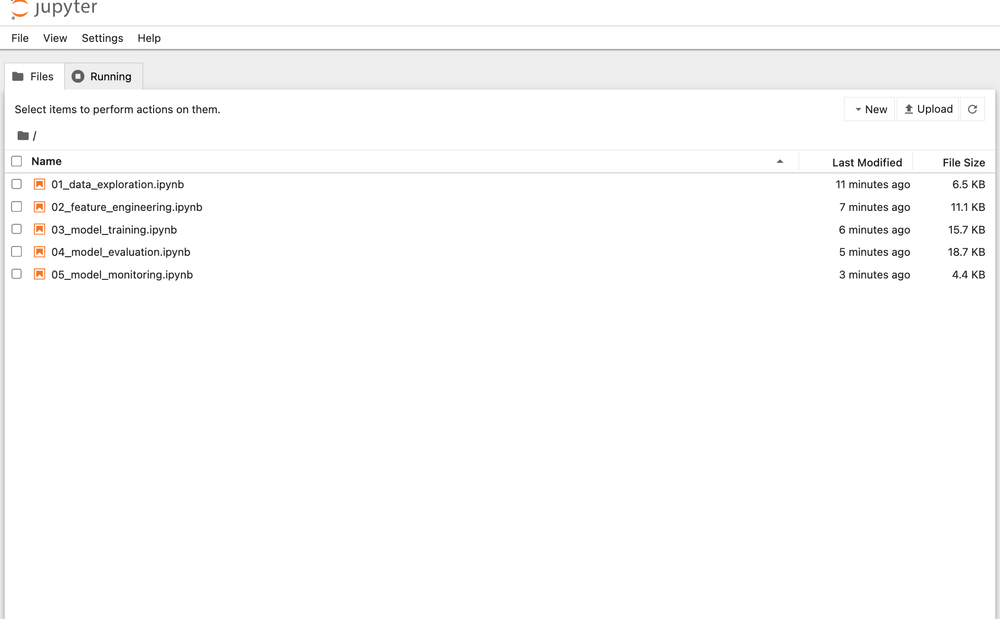
Run Notebooks
make jupyterExample output:
make jupyter
./venv/bin/python -m jupyter notebook notebooks/
[I 2025-08-09 18:56:38.988 ServerApp] jupyter_lsp | extension was successfully linked.
[I 2025-08-09 18:56:38.991 ServerApp] jupyter_server_terminals | extension was successfully linked.
[I 2025-08-09 18:56:38.993 ServerApp] jupyterlab | extension was successfully linked.
........
......
Run everything via Docker Compose
make docker-build
make docker-up
If you want to stop all Docker Compose services:
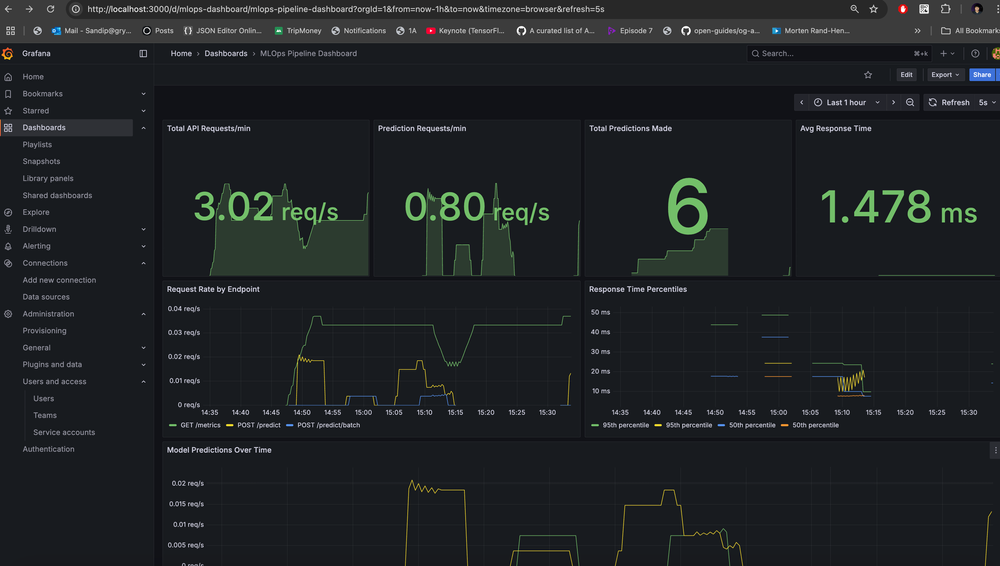
make docker-downThe Docker set-up runs MLFlow as well as monitoring via Prometheus & Grafana!
Grafana will be accessible at: http://localhost:3000/ and check the MLOps Dashboard: http://localhost:3000/dashboards
GitHub Actions CI Pipeline
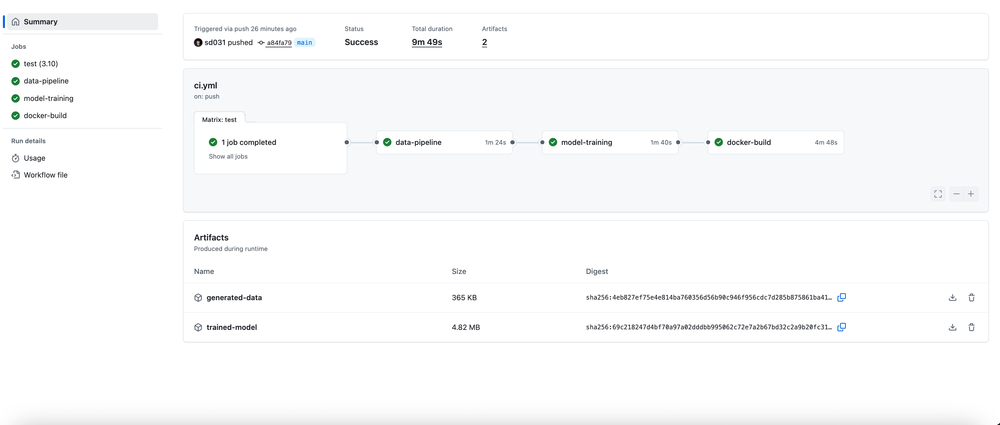
CI.yaml
name: MLOps Pipeline CI

on:
  push:
    branches: [ main, develop ]
  pull_request:
    branches: [ main ]

jobs:
  test:
    runs-on: ubuntu-latest
    strategy:
      matrix:
        python-version: ["3.10"]

    steps:
    - uses: actions/checkout@v4

    - name: Set up Python ${{ matrix.python-version }}
      uses: actions/setup-python@v4
      with:
        python-version: ${{ matrix.python-version }}

    - name: Cache pip dependencies
      uses: actions/cache@v3
      with:
        path: ~/.cache/pip
        key: ${{ runner.os }}-pip-${{ hashFiles('**/requirements.txt') }}
        restore-keys: |
          ${{ runner.os }}-pip-

    - name: Setup project
      run: make setup

    - name: Run unit tests
      run: make test-unit

    - name: Upload coverage to Codecov
      uses: codecov/codecov-action@v3
      with:
        file: ./coverage.xml
        flags: unittests
        name: codecov-umbrella

  data-pipeline:
    runs-on: ubuntu-latest
    needs: test

    steps:
    - uses: actions/checkout@v4

    - name: Set up Python 3.9
      uses: actions/setup-python@v4
      with:
        python-version: 3.9

    - name: Setup project
      run: make setup

    - name: Generate data
      run: make generate-data

    - name: Process data
      run: |
        # Copy raw data to processed directory with expected filename
        mkdir -p data/processed
        cp data/raw/customer_churn.csv data/processed/validated_data.csv

    - name: Upload data artifacts
      uses: actions/upload-artifact@v4
      with:
        name: generated-data
        path: data/

  model-training:
    runs-on: ubuntu-latest
    needs: data-pipeline

    steps:
    - uses: actions/checkout@v4

    - name: Set up Python 3.9
      uses: actions/setup-python@v4
      with:
        python-version: 3.9

    - name: Setup project
      run: make setup

    - name: Download data artifacts
      uses: actions/download-artifact@v4
      with:
        name: generated-data
        path: data/

    - name: Process data for training
      run: |
        # Ensure processed data exists with expected filename
        mkdir -p data/processed
        cp data/raw/customer_churn.csv data/processed/validated_data.csv

    - name: Initialize database
      run: |
        # Create database tables if they don't exist
        ./venv/bin/python -c "
        from src.utils.database import DatabaseManager
        db = DatabaseManager()
        db.init_db()
        print('Database tables initialized')
        "

    - name: Train model
      run: make train-model

    - name: Evaluate model
      run: make evaluate-model

    - name: Upload model artifacts
      uses: actions/upload-artifact@v4
      with:
        name: trained-model
        path: |
          models/
          mlruns/

  docker-build:
    runs-on: ubuntu-latest
    needs: [test, model-training]

    steps:
    - uses: actions/checkout@v4

    - name: Set up Docker Buildx
      uses: docker/setup-buildx-action@v3

    - name: Download model artifacts
      uses: actions/download-artifact@v4
      with:
        name: trained-model
        path: .

    - name: Build and test Docker images
      run: |
        make docker-build
        make docker-up
        sleep 30
        docker compose ps
        make docker-down
Example Execution: Check here
Final Thought
This end-to-end MLOps pipeline project successfully demonstrates how to transform a simple customer churn prediction model into a production-ready, scalable system with comprehensive automation, monitoring, and observability. The integration of Docker containerization, MLflow experiment tracking, Prometheus metrics, and Grafana dashboards creates an enterprise-grade architecture that addresses real-world ML deployment challenges.
The project's automation-first approach with Makefile integration ensures consistency between local development and production environments, while the comprehensive Jupyter notebook suite provides both educational value and practical implementation guidance.
The inclusion of data drift detection, automated model retraining, business impact analysis, and security scanning makes this a complete blueprint for modern MLOps practices.
This project stands as a valuable resource for MLOps Engineers or anyone trying to learn ML/MLOps in a hands-on way!